


Friday, December 18, 2009
post://4672237220726642051/Windows 7 Games Explorer Manual Customization How To
Windows 7 has removed the ability from Games Explorer to Customize out of the box.
It's not impossible to do, however - it just takes some finangling and registry knowledge.
All of your Games Explorer shortcuts are stored here:
%localappdata%\Microsoft\Windows\GameExplorer
If you have games installed you should see several folders with very long names that start with {######...
Each of these is the unique game ID used by Windows to synch the icons and commands that appear in the Games Explorer to the actual EXE that runs the game.
These numbers correspond to the values in the registry here:
HKEY_LOCAL_MACHINE\SOFTWARE\Microsoft\Windows\
CurrentVersion\GameUX\Games
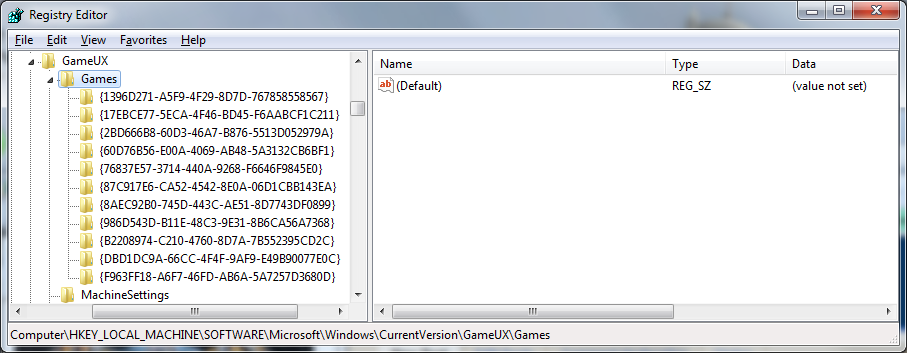
By clicking on one of the IDs in the registry you can figure out which game is which:
IE {1396D271-A5F9-4F29-8D7D-767858558567} is Batman for me.
When I click the ID folder the config options are on the right including the full path so you should be able to find which ID corresponds to which game.


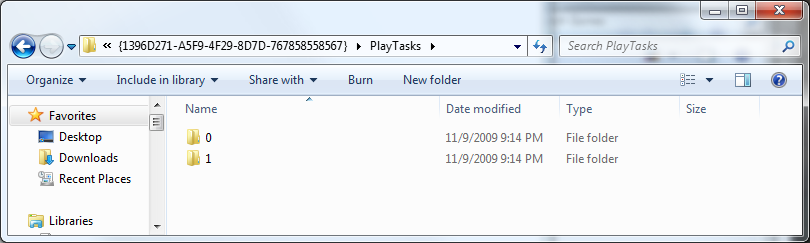
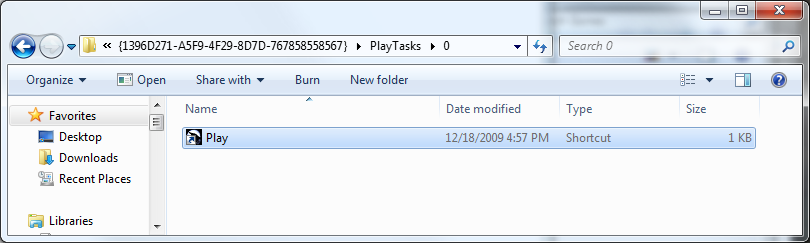
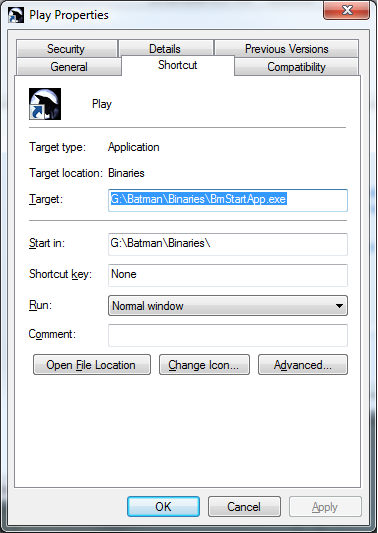
To modify the options for a game like change the path, or even add additional play or right click options, just modify or add a folder within PlayTasks for that game. I believe you are limited to 0 to 5 tasks, but try it. Batman's 0 task is Play and the 1 task is Support. So within PlayTask\0 (default) for Batman is a shortcut named "Play". Right click and choose properties as you would on any other shortcut and modify the files as you need to (run as admin, compatability mode, etc). To create a new play task you could make a folder named "3" and within that place a shortcut named as you'd like it to appear on the context menu.


Finally, you can also modify the box art shown in GamesExplorer or even add box art for games that don't have it by default by modifying the images in the
%localappdata%\Microsoft\Windows\GameExplorer folder.
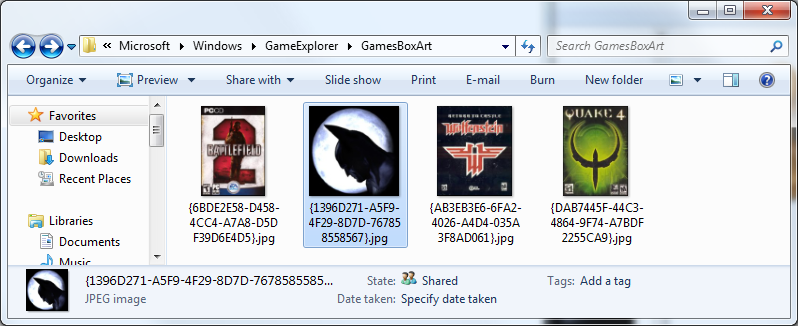
Simply name the file (jpg) with the same ID as the game, voila - you have your game listed with special icon or box art in Games Explorer.
Labels: 2009, games for windows, howto, technology, Windows7
posted @ 16:59
-x-
(0) comments | Post a Comment
Saturday, September 12, 2009
post://2987336471837986745/6 installations later I have a working copy of Windows 7 with valid RAID, SATA, Chipset, Video, and Sound drivers. I was very careful this time, doing only one thing at a time and restarting after a change to confirm. I was a bit more cavileer when I was under the impression my errors could be undone. The restore feature was not able to handle the driver change for vital components so keep that in mind when you're upgrading. Vista had similar problems, I wasn't able to install it until SP1.
My first step once getting SLi working was to test the performace of games. I was able to test a couple DEMOs as is but GTA required a reinstall since it has so many background requirements. All in all I saw HUGE gains visually, everything ran better, something I'm not used to seeing from new (PC) OSs.
To further put this into perspective - in Vista my video cards are overclocked a good 40mhz higher, the video cards are running at stock speeds in Win 7.
Here are the numbers from GTA:
Windows 7 - GTA v1
Average FPS: 40.12
Duration: 37.37 sec
CPU Usage: 74%
System memory usage: 37%
Video memory usage: 50%
Graphics Settings
Video Mode: 2560 x 1600 (60 Hz)
Texture Quality: High
Render Quality: Highest
View Distance: 32
Detail Distance: 70
Windows 7 - GTA updated
Average FPS: 43.98
Duration: 37.45 sec
CPU Usage: 78%
System memory usage: 39%
Video memory usage: 53%
Graphics Settings
Video Mode: 2560 x 1600 (60 Hz)
Texture Quality: High
Texture Filter Quality: High
View Distance: 32
Detail Distance: 70
Vista - GTA updated 1920 x 1200
Average FPS: 37.65
Duration: 37.61 sec
CPU Usage: 81%
System memory usage: 44%
Video memory usage: 57%
Graphics Settings
Video Mode: 1920 x 1200 (60 Hz)
Texture Quality: High
Texture Filter Quality: High
View Distance: 75
Vista - GTA updated 2560 x 1600
Average FPS: 32.02
Duration: 37.72 sec
CPU Usage: 74%
System memory usage: 43%
Video memory usage: 59%
Graphics Settings
Video Mode: 2560 x 1600 (60 Hz)
Texture Quality: High
Texture Filter Quality: Very High
View Distance: 100
Detail Distance: 50
*update* Futuremark Vantage Score: 14100!
Direct Link
Labels: 2009, games, games for windows, RAID, technology, Windows7
posted @ 09:54
-x-
(0) comments | Post a Comment
Thursday, September 10, 2009
post://4541716393206416641/Windows 7 - Don't Rush It.
That's a cautionary statement, a metaphor, and a realization. I had a LOT of issues with this installation and I'm not even at a point where I can benchmark. 3... maybe 4 installations at this point and I think I've finally got it. I put in another HD so I could avoid RAID issues and I still run into them.
My motherboard has 10 SATA ports 4 on one SATA controller, 6 on nVidia SATA RAID. I avoided trying to bring over the RAID right away, instead having a single HD on the ontroller but not actually in RAID mode and STILL ran into issues. 7 even played with my RAID 1 a bit and broke the mirror after I installed the drivers but I really think that's more nVidia since it was completely dependent on their drivers. If nVidia didn't try and break whatever BIOS RAID existed when they installed their Windows software I might have not been impacted, but instead they gave me a minor heart attack by breaking my mirror. I restored it by killing the secondary RAID mirror and reallocating it via a rebuild to the first but dang if it didn't make me fear for my data in the meanwhile. I've lost too much data, finally learned to go mirror vs striping and this is how I am taunted. Whatever - worked out ok in the end after rebuild.
I finally have my nVidia control panel as I remember it, SLi and all. I can finally do some performance testing, and that's what I'm after.
PhysX off the onboard 780a SLI chip
Enabled SLi for the 2 x 285 2G EVGA cards
clicked apply... and... we have liftoff!
A system rating shows they've gone past the 5.9 max rating and I now get 7.9s on everything except the hard drives. However, Windows 7 is not running off my striping array so it's not really expected I'd get the best performance. It's all awaiting my theory of 2 x 120G SSD drives in Striping. I can't think of anything that could be faster. I don't know what that might drive to game performance but if previous experience is any indication - that's a sure cause to make me drop a hard earned dollar.
Labels: 2009, crash, desktop, RAID, review, SLi, technology, Windows7
posted @ 23:20
-x-
(0) comments | Post a Comment
Saturday, April 18, 2009
post://3466609533750886962/Oh... so nice.
I just re-downloaded much of the old music I had purchased off iTunes. iTunes finally went full DRM free - 256k, not the best but almost. 320k is the most you can get normally and most pop tunes won't fill that bandwidth on VBR (variable bit rate - adjusts the size to fit how complicated the music is).
In any case there were a lot of tracks I had lost when the mac harddrive originally went - I had backed it up but I hadn't gotten them all. At the time Pepsi was doing their promotion. 1 in 5 caps had a free code for an iTunes download. On a hunch and a curiosity trip I bought 5 one day. I won a free iTunes download on 4 out of 5 and was hooked. For the rest of the summer I never bought fewer then 5 pepsi's at a time. By the end of that summer I believe I garnered over 130 songs before that promotion was through. Free songs, free soda - however you want to look at it.
I was just presented the opportunity to purchase my previously purchased songs. Granted, it's a little bit backwards sounding - I've already paid for these, why do I need to re-buy them? Well, it used to be that you had to do your entire library - an all or nothing sort of thing. A lot of those for me were free tracks or tracks I found sucked after I downloaded the whole thing and got to listen to more then 30 seconds. There was no way I was paying $235 for all the tracks I had ever downloaded. I've now gone through and cherry picked the best ones. I can now use these AAC files with my XSession Pro for mixing without having to record a playing iTunes DRM'd file and make an MP3 of it. It's worth the effort to pay an extra 30 cents for that.
In any case check it out and see what you can do for upgrades.
Labels: consumerism, music, technology
posted @ 00:54
-x-
(0) comments | Post a Comment
Wednesday, April 15, 2009
post://219228377295947926/iTunes has added a new feature:

Your guests with an iPhone (and the remote app) can request songs to the now playing list.
Labels: music, technology
posted @ 18:42
-x-
(0) comments | Post a Comment
Tuesday, April 07, 2009
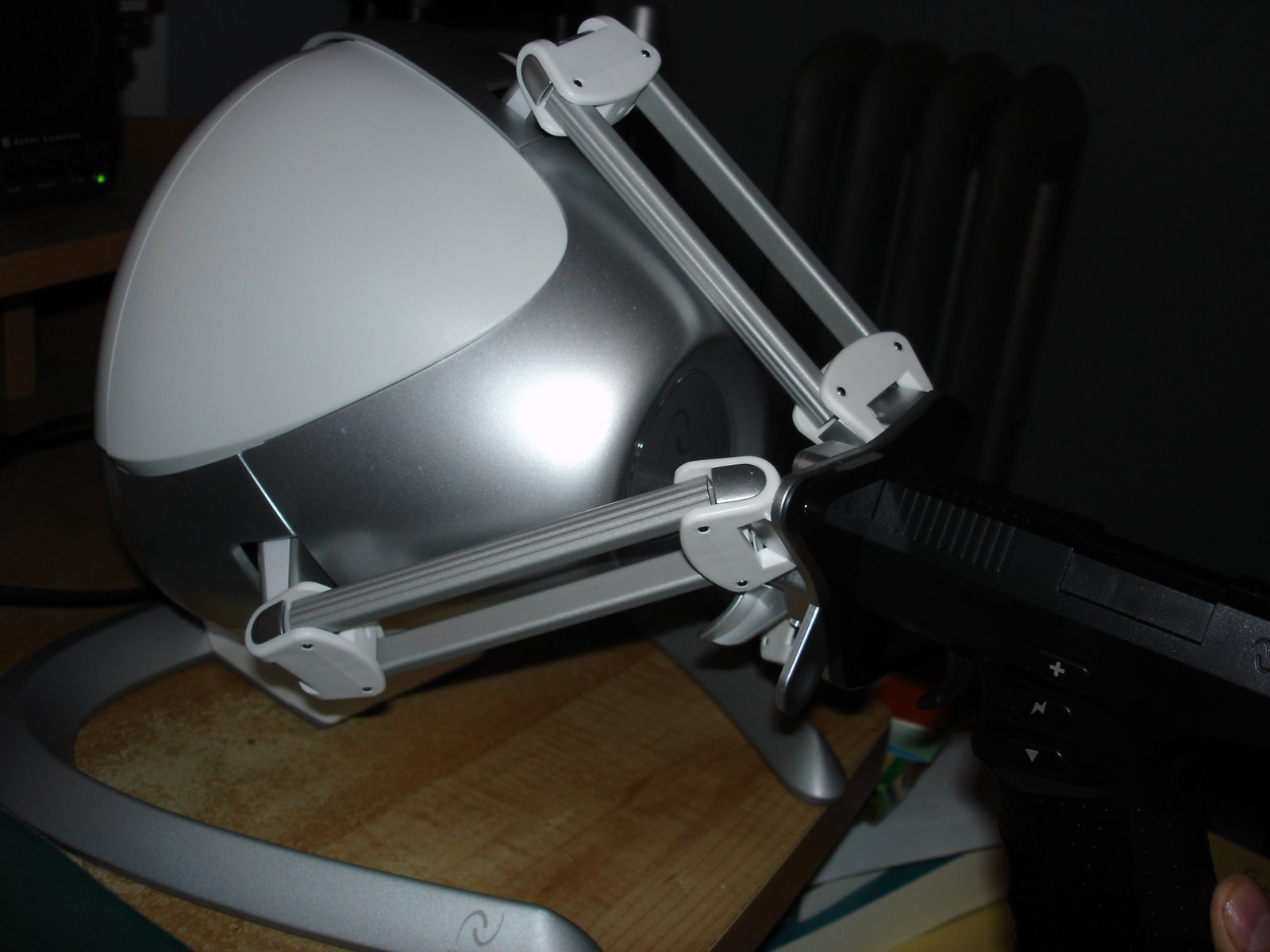
post://7853510666201610976/more to follow, teaser:


Labels: 2009, consumerism, games, games for windows, hardware, technology
posted @ 21:05
-x-
(0) comments | Post a Comment
Thursday, March 26, 2009
post://6837641428007151744/This year's birthday spoils:
- iPod Nano
- Novint Falcon
- NFS Undercover
- BF2142 Deluxe (for the living room PC)
I ended up working half a day today, spent the 2nd half being productive and hanging out with the dog.
I went and got my winter tires off the car, I think we're safe for snow. If it comes now I just won't go anywhere :)
I spent that time waiting listening to my iPod - I was totally that guy in the store with the iPod on. I meandered around Home Depot, looking at some bathroom stuff, and I found a fence I liked. I picked up a rake, and walked back to pick up my car. I didn't really think that much of it, but people look at you funny when you walk into a waiting area with a rake.
It wasn't too long, though I noticed something odd about the iPod touch. Even if you have video in your audio playlist it won't make it to your iPod unless you add the playlist under the video section. I have this thing about rating. I love rating my music, and now that I've perfected moving my whole Library (album art, comments, ratings, along with all the files themselves) I've gotten more serious about it.
1 star - don't like it, don't like it at all - I'll probably delete later
2 star - I appreciate it, but I don't like it enough to have it be played in my background music
3 star - background music
4 star - really good
5 star - makes me stammer when attempting to describe, tear up, or jump up and down
Armin Van Buuren - Shivers (Rising Star Mix) is a good example of what I'd give a 5.
I set up a running playlist of only non-rated files listing the newest out of whatever size, or number of files I restrict it to - but never put much of a dent in it, at least not until I got Jamie's old iPod. It was kinda broken, had synching issues - but she gave it to me for helping with her computer and I got it to mostly work. Doing things very patiently I could reload it ever 5 synchs or so and I'd get about 4 days worth of ratings at a time before I'd have to reload the firmware on it. With an iPod I could now rate the music during the day in the car or at work - I got a lot done.
It eventually frustrated me to the point of crushing it, so of course I took it apart to check it out. I've been non-rating MP3 playering since, at least I had a backup. Now I'm back in the groove. I also had to get a new case because the neoprene DLO case I had for the 1st gen nano covered the bottom 40% of the wheel on the new model - bastards, change it juuuuuust enough.
So I got BF2142 all working for the weekend - coupld of the guys are coming out and we'll have a multi-computery dethmatch of deth, so wanted to make sure all was in tip top shape. I also just installed NFS - I know it's going to be corny, but lets go see what they did with the graphics and this new "Heroic driving engine".
Labels: 2009, birthday, games for windows, hardware, music, technology, update
posted @ 10:09
-x-
(0) comments | Post a Comment
Friday, March 20, 2009
post://1044381229610060318/If you were talking about a "car" 3 years ago, you might have had referred to the resurgence of the muscle car, with larger, more powerful engines with hardly a mention of fuel economy. After the fuel crisis of the past summer though, everyone was looking at cars in a whole new light. They wanted fuel economy, and hybrid technology in their cars.
I believe we would have gone much further and faster too, if it weren't for the economic slowdown that inevitably followed. No one wanted to buy cars, even the specialty hybrids. Before the downturn the demand for hybrids was so high that Toyota had slated a plant in the US designed especially for their Prius line alone but by December of 2008 - they had halted construction (1).
The idea of a hybrid car is certainly not new, and neither is an entirely electric car. In the early 1900s electric and petroleum based cars were large rivals, but after some major technological breakthroughs - petroleum based vehicles became a more economically sound option. Where petroleum cars were roughly $650, electric cars sold for about $1750 (2).
In 1990 California passed a revolutionary new law, the zero-emission mandate which would require 10 percent of new vehicles sales in the state to be all electric by 2003. It based this on a goal of reducing greenhouse gas emissions to 80% of the 1990 level by 2050, so in order to reach this goal they would need to have at least 400,000 zero emission vehicles on the road by 2020 (3).
This early push "sparked" a major electric offering by all the major car companies, and especially by GM with the EV1. An all electric vehicle - it required a charging station placed in the home or garage. In addition, there were several public charge locations set up with taxpayer dollars throughout the state. The goal was to start creating the infrastructure to support this new automotive model. It would have succeeded, if not for a push by the car companies to declare the law unconstitutional. They said they could not do it and remain profitable in the state, proposing a lack of vehicles being available and with that, a lack of new car sales, and new car sales taxes.
The push worked, CA caved on their requirements and all the companies began taking back their vehicles from consumers. Offered only on limited 3 year leases, and not for purchase, there was not one person who owned their EV1 - they were all repossessed, in some cases by force. The EV1s (along with the other company models) were carted off to large lots behind the company headquarters, or hidden in fenced in areas. There they sat for years, with vigilant watch by many electric car proponents. When the cars were finally moved to their final resting place and crushed, police were called to escort the car carriers full of revolutionary cars to protect the trucks from the activists, many who protested by laying down in front of or blocking the trucks. (4)
We could have gotten to this place much faster, but the environment was never as much on the table as our hard earned cash.
1.) http://www.environmentalleader.com/2008/12/17/toyota-halts-construction-on-us-prius-plant/
2.) http://en.wikipedia.org/wiki/Electric_car
3.) http://www.hybridcars.com/news/california-air-cuts-electric-car-goal-again.html
4.) Who Killed the Electric Car?: http://www.youtube.com/watch?v=mA2u_KbCs6A
Netflix: http://www.netflix.com/Movie/Who_Killed_the_Electric_Car/70052424
Labels: school, science, technology
posted @ 22:37
-x-
(0) comments | Post a Comment
Friday, March 13, 2009
post://3876978030638891391/I start school on Monday - already hopped online to get a peek at the workload. I stuck with 1 major class and 1 short class this semester to start out. I would like to have an idea of the workload so I can plan for the following semesters.
I'm taking Science and Technology in Western Culture as well as Planning and Finalizing the Degree. I can also get college credit for real world experience which ought to start me off with about 16 credits + the 12 from the bit of college I started. I really can't say how long it might take to get my degree this way but that puts me a little ahead of the game.
I'm nervous about the obligatory math class. I can program a computer to do many complicated things and can wrap my head around writing an application that considers what our work load would have looked like last week and speculates future need but give me a basic trig or calculus problem and I get a little overwealmed. I get the concept, but it needs to be tied to something tangible for me to understand.
Of course History has never been my strong suit either, I'm interested by it, but I can't remember it - and they test you by asking really specific information. I get the general concepts but can't remeber the names and dates very well. I also never saw the purpose in memorizing those things just for the test. I always felt the point was to get the idea, know where we came from and learn from the past.
There's a fair ammount of reading, quite a few DVDs to watch, and a lot of discussion with this history class. You're also supposed to post everything online in the forums and respond to at least 2 other posts by other people. Maybe being able to write out my answers will work better then vocalizing my thoughts. I was never very good at speaking in front of the rest of the class.
Labels: 2009, history, science, technology, update
posted @ 11:42
-x-
(0) comments | Post a Comment
Sunday, January 25, 2009
post://6816059569584533463/So I've spent the weekend... well, I guess that could be extended to the past month, doing computer stuff. I placed the hardware order on December 31st (so I could include it in the business costs for 2008) and received them on the 7th or so.
From there on it's been computers, computers, computers. I upgrade my own to free up a power supply and memory for my new Media PC for the living room. I took all the old stuff I had and got a brand new media pc case for it all. It's about the size (amazingly close in size) to my receiver and now have it all nicely arranged in the new entertainment center.
The original order started with Jamie. Her computer was up to the gill in spyware and antivirus and she was looking for a way to record TV. Since the existing setup couldn't quite pull that off I came up with a solution for her - a Media PC / desktop. That got me thinking about an actual media PC for myself and lead to me ordering the new case and replacement parts for my desktop so those old parts would be available for the Media PC.
In any case I came up with a really nice Thermaltake box case (like a shuttle case on steriods) and TV card arrangement. I waited on the TV card for myself until I could confirm if Comcast is QAM in my area. Per my experience with Jamie's PC being plugged into my cabe I can confirm it is not. They give me one digital channel in high quality off the line and it's always an add for a Wrestling PPV. So the only channels on my network are analog and most of those have that little known property that Comcast actually just got fined for - many of the channels say "this channel is still available on the digital teir" to try and entice the $13 a month-ers.
So I was working on 3 computers, more upgrading 1, making another from old parts in a new case and building a new system. Then Joe from Finishline called me. I haven't done business with him in a while - over a year in fact. It got where I was spending a lot of time supporting him over the phone with questions and the like and not getting anything from it. I finally started charging him for phone support and he didn't pay those invoices. I took the loss and moved on but he recently started calling me again when "his computer got stolen". He had taken it to a local shop for repair and they closed up and took his computer with them. They didn't return it and wouldn't return his calls. He ended up getting it back but it had been in the middle of a system refresh and was apart all over the place. He was in a bind and I'm planning on charging full price, so I agreed - that made the 4th.
So here I am in the office all weekend, with multiple computers on a KVM going back and forth between them, installing, downloading drivers, tweaking, and loving it. Of course, my ADD (or so the pamphlets would have me believe) never lets me focus for very long so I'm in and out of the office as things format and download so I'm not completely holed up the whole time. As a matter of fact I even had dinner with my wife last night, then we watched the office (had to resort to Hulu due to the cable issues) and then caught up on the Kyle XY finale from last year (we'll probably check out this season tonight). I then had Nicole try out Civ on the PS3. It's a pretty good game, and she didn't experience anywhere near the performance problems I had. She won via domination but to be fair she was building the United Nations... it just happened that Abraham Lincoln got his panties in a bunch before it could get completed.
So though I've been busy this weekend, but all in all it's been fairly enjoyable. The only thing I might like more is if the office was clean, but I can get around to that once I'm not using it to build. I so need to sort through my stuff and throw out the old parts(PIII and under). As it is I could never receive purely professional customers.
Side note - found this while browsing: The Unwanted Blog
It's got a lot of very cool general interest stuff as well as technological and historical items. A great blend of all things I'm interested in.
Labels: 3dmark, games for windows, graphics, hardware, link, technology, vista
posted @ 13:35
-x-
(1) comments | Post a Comment
- side note about the link - of course nothing is perfect and though this blog is great otherwise, he does seem a bit bitter about Obama. Just have a little hope, give it some time, and I'll welcome your point of view in a couple years.

Sunday, January 04, 2009
post://6159892700569416999/Peapod has taken forever to come to the area... it sucks because I would love to order my groceries online and then have them delivered. The next best thing to that is ordering online and picking them up. Well the time has come for online grocery shopping as Big Y has BigY2Go in Greenfield and Springfield (Walpole too but that's all Boston-y).
I was able to go through our entire grocery list and order. You can search, or go through by category and choose what you want in your order. The best part was that it not only shows you the sales, but you can sort by unit price so you can see which is the cheapest method of buying each thing. I saw poptarts, an 8 count and a 12 count and I could see the 12 count was quite a beat cheaper per unit.
That may seem obvious, but there are other foods where it's not so obvious, and even when I'm curious I don't want to look all over multiple shelves comparing the tomatoes... and what happens when you see that thing you want in an odd part of the grocery store, do you go look for the best deal where it's home is, or do you just pick it up? That's what they're counting on!
Shopping this way allows me to see all the raisins available, and judge whether it's really worth the 6 cents a unit or 30 cents a package for the better tasting ones. The issue can't really be made for saving money, however - because if you were really looking to save all this money you wouldn't be paying them $10 to go grab your list of items off the shelves for you.
$10 for an entire order of groceries (translates to $3 an hour the way I food shop) is well worth it, and I feel quite a reasonable price. So if you live in Springfield or Greenfield MA - give it a shot, it sounds like this could be the feature and I'm loving the potential.
Labels: consumerism, cool, technology, web
posted @ 21:42
-x-
(0) comments | Post a Comment
Sunday, December 07, 2008
post://6314627219298098290/Here's the same progression in GTA benchmarks. I didn't have to do much work for this because GTA writes each benchmark to a separate txt file automatically. I pasted into Google Docs and made a graph of it all.
The details are here but this is the graph:

Labels: 3dmark, consumerism, games for windows, hardware, materialism, SLi, technology
posted @ 11:37
-x-
(0) comments | Post a Comment
Saturday, December 06, 2008
post://8239767402186441602/Ok, so after the dust has settled I've completed the Hard Drive externalization (technical prototype) and here are the past couple benchmarks:
2 x New Graphics Card + CPU
New Graphics Card + CPU
New Graphics Card
New Motherboard
Original
Read em and weep.
Labels: 3dmark, consumerism, games for windows, hardware, materialism, SLi, technology
posted @ 22:51
(0) comments | Post a Comment
post://7178261761764014228/
I think I've thought of all that though being short on material and the means to create something like this, I'm a bit unsure how I'm going to work it all through.
For now maybe I'll use some metal "gutter mesh" I have left over from my bumper screen I made for my Legacy. I had taken a rock directly through the intake area of the bumper the first few months I had the car - took out the whole A/C grate so I made a guard for those rogue CT highway rocks.
In any case it's about 2 feet long and 6 to 8 inches high, originally meant to keep the leaves out of gutters. It's got small enough holes where screws ought to hold and it's bendable while still being (somewhat) strong enough to hold the hard drives.
The "prototype" if you will, is actually just 2 3.5" bays of 3 slots each from 2 old computer cases. My plan is to put them side by side but there's actually no room for that with my current setup. In order for the SATA cords to reach outside the tower, the whole arrangement needs to be pretty close.
So here is what I've got so far and in concept it works. I jumped a 250W power supply according to this ATX Power schematic. So it's switched off the power supply itself and otherwise "always on".
After speaking with my electrician friend at lunch he said that I had to be careful because without a load on the other end, running a "jumped" power supply would overheat if it couldn't offload it's power. The other thing to note is that a jumped power supply will also always run at full load, so that's a constant 250W. Still better then a variable (with new energy star 80-rated) 1.3 Kilowatt power supply.
So here's some pics, I'll post more as it evolves/burns up.


Labels: pics, project, technology
posted @ 16:45
-x-
(0) comments | Post a Comment
Wednesday, November 05, 2008
post://601768146272237493/I was surprised to hear that Michael Crichton died today.
He's probably my favorite author, followed closely by Douglas Adams who died just a few years ago. I think I need some new authors, but I'm afraid they might die on me. At the very least there are a still of Michael Crichton's books that I have not read and remain on my bookshelf. There's just so much I loved about how he created a picture with his words that my mind just ran off with. I was able to picture them much more vivid then any movie could convey, and in the case of Timeline actors could portray.
I was actually inspired to write my first computer program based on Jurassic Park. With my TI80, a black and white TV, and book in hand - I set out to recreate the computer system in the book. From the main menu and submenus you could do an array of things from jump-starting the generators (to get the fences back online) to recycling the door locks. I also made it into a game by creating different scenarios and error messages based on what you had already done, and with certain dependencies that had to be met before you were allowed to proceed.
I'm really sad to see him go, one of the only people that could get me reading like you hear about - nonstop until it's done. He touched on cancer quite a bit in his novels and even in ER - which ironically enough even with his money and knowledge, he was still unable to overcome.
Labels: books, death, games, nostalgia, programming, technology
posted @ 20:46
-x-
(0) comments | Post a Comment
Wednesday, October 22, 2008
post://8616507402771462167/Nicole got her G1 yesterday - the first and foremost "Google phone"
It runs android - the open source phone OS developed by Google.
At first glance it's about the side of an iPhone (and that's the exact demographic this phone is going for) though no where near as sleek. The screen swings out from the base and pops into place when going into landscape mode.
The home screen has a clock widget with 4 basic icons at the bottom. It appears you can fill up the whole screen with up to 16 icons, if you didn't have the clock there. You're not limited however, because if you slide your finger to the left or the right you have an additional screen on either side for other program icons or widgets. If your application icons aren't on the desktop, they're in the application window. Touch and slide the application tab at the bottom upwards and you'll see all your program icons but I didn't see a way to organize them such as folders or sorting. I'm awaiting more widgets, such as weather or RSS, but with Android being open source - it's only a matter of time (and it'll probably be free).
Making a call is pretty quick and the contact list imports your Gmail address book as soon as you add your info. It's a very detailed set of information and it's easy to add to it when you have a new number - just hold your finger on the number and you can choose new or add to existing.
The camera supports embedded GPS information, for those who like to add to Google earth.
There's no brightness/contrast that I could find, nor a zoom feature but it's pretty high quality with good autofocus. I'd also like to see video capture, but that's probably on the way.
Trackball is great - I'd compare it to an IBM laptop intellistick, similar texture but I still can't say for sure whether it's actually rolling or inferring based on the direction I'm moving my finger over the textured surface. In either case it's really sensitive and great for more accurate movements.
The google maps is pretty good, and uses mylocation over gps by default, so you have a large circle that is your general proximity rather then a precise dot. You can see streetview, which brings attention to one of the coolest features: Compass mode. If you're in streetview and turn on Compass mode whichever direction you turn (even up and down), the phone will indicate the corresponding street view. It's fancy and impressive, but I couldn't see a need for this at first until I realized this was "compass mode" - ie: which way is NESW. The image is good just for verification but not much else other then cool factor and I can't see it working without streetview at your location.
Setting up email was pretty quick, and we were able to get to both web based email as well as import an IMAP (also supports pop3) account without issue. It inferred the servers from the email address, just provided the password and boom - all set.
The data transfer was acceptible, but nowhere near "high speed" as it took over 45 minutes for a 20mb video file. Speaking of which: there's no standard video player. You can view YouTube but individual movies don't play.
When checking voicemail, it was neceesary to pull up the phone keys, press the button to delete, and then put the phone keys away, otherwise I'd accidently hit the keys when I put the phone back up to my ear. So it can be cumbersome to go through several voicemails at a time.
The touch on the screen isn't overly accurate, and dragging can get tricky. You also can't drag an icon from one section of the screen to another. For example: move an icon from the middle screen to the right or left when your main screen gets full. To do so you have to drag the icon to the apps tab to remove it, and re-add it to the screen where you want it. It's not that big of a deal, easy enough to do, but a seemingly needless limitation.
Depending on the application it's difficult to tell when you should hold your finger down, slide it, or tap. I had to try it several different ways for most applications to figure out which was necessary for the particular application. I think this is mostly standardization at this point, and will probably get better as developers get to use the device more.
The battery life doesn't appear to be stellar. I charged it to full in about 3 - 3.5 hours, then used it to download and perform nonstop data transmission for about 3 hours before it was down to 50% battery. I charged it overnight so we'll see how it does after a normal day in standby.
I'm a bit worried about the application store. Granted - each application tells you what permissions it requires from your phone before you download - but that alone can scare you. I'm worried about the rogue program that does what it promises but is actually phoning home and sending your info while you're using it. A lot of the applications require "full internet access", "gps positioning", and some even "access to contact information" such as the Weather Channel's application. That's pretty scary and I'm concerned what they might do with it - some people never read the fine print for free programs.
All in all it's a pretty powerful phone with a lot of potential. It's fairly slim, fairly light and the keyboard is handy and with the trackball you can do everything but type when the keyboard is away. It didn't do much without a data plan, but it does work. It can use wifi, and even with no data* or wifi I was still able to pull down GMail but no web or Pop3/IMAP. There's also no proxy settings like in Windows Mobile so looks like you'll need that $30 data plan.
*-I have Voicestream 2.99 unlimited wap internet on my account
Labels: consumerism, cool, linux, materialism, review, technology
posted @ 11:36
-x-
(1) comments | Post a Comment
- ...I'll proofread later :)
Thursday, October 02, 2008
post://7950685253127620400/
Here's what I got with the MKZ Benchmark:
Labels: games for windows, technology
posted @ 21:05
(0) comments | Post a Comment
post://2317820311472832986/
This means towers that can be taken down, realistic wall destroying, and many other items only possible with a physics engine. Just like GPUs advanced the graphics, Physics processing will advance the gameplay and realworld feeling of video games.
Labels: games, games for windows, graphics, technology, video
posted @ 19:44
-x-
(0) comments | Post a Comment
Sunday, June 15, 2008
post://7579065082664969228/I picked up another card to do SLi this weekend. I wanted more, I wanted 2560x1600. I priced out what it would cost me to get a 9800GX2 including the trade-in from EVGA and it was going to be like $350+, so I instead spent $170 for another 8800 GTS - which were getting scarce so I moved on it.
I tested using 3D Mark Vantage (for VISTA) as my existing 3D Mark 2006 is not working in VISTAx64 because it says OpenAL32.dll is not present (which it is).
I'd rather use 3DMark 06 as it's a more accurate guage given my past configurations were also based in 2006 but with Creative software not installing for some weird error they can't solve I'm just working with what's working for me.
In any case, you'll see the difference with the score of 1 8800GTS vs 2 in SLi
1 x 8800GTS 640mb
Score: 4383
- CPU: 4228
- GPU: 4437
2 x 8800GTS 640mb in SLi
Score: 6642
- CPU: 4275
- GPU: 8145
I might post another score if I try some overclocking. It's nowhere near the 20,000 score reached by an individual with a QuadCore, 9850GX2, and PhysX card but I figured it out and I'm 118260 out of 155217 total, so that's a decent standing with a 76%.
Labels: consumerism, games, games for windows, hardware, SLi, technology
posted @ 21:43
-x-
(0) comments | Post a Comment
Tuesday, April 29, 2008
post://7782757885757208656/I picked up GTA IV this morning, and by some odd cooincidence also had today off. I popped it in, it did a file copy to the HD (about 5 to 10 minutes) which is like 3+ Gig.
I got in it and it looked blurry... I checked the box, 720p, 1080i, 1080p... and then I checked the TV - 720p. There were no settings in the game (guess I'm too used to PC games) so I went out to the main PS3 menu. There are normally settings when hitting /_\ but not in this case - nothing relevant other then it's a parental control level 9 game :)
In any case I finally weeded through all the tiny text in the back of the game manual to find the technical support line. I got through after not too long (they'll probably get a bunch later on) and spoke with the guy. I was skeptical at first because he told me it was the display settings of the PS3. He told me (in a cockney accent) that I'd need to set it to 1080p. I said I was in 1080p and the main menu was displaying in 1080p, so I knew it was working. He put me on hold to check.
Apparently in the display settings you can check all the boxes for the resolution(s) your TV can handle. I had 720p, 1080i, and 1080p checked. Per his instructions I unchecked 720p and left 1080i/p.
Saved, went back into the game... and voila 1080p.
So if you're experiencing issues with GTA4 getting HD res, you need to take 720p out of your settings. I assume they'll fix this with an update down the road, but if you're checking it out day 1, you may want this handy little tidbit.
*sidenote*
After some additional confusion regarding the multiplayer aspect, simply press Up on the D-pad and then X when the phone is up to get the sub-menu.
Check out the Getting Started in Multiplayer for GTAIV PDF. It's got both PS3 and XBox360 but I bet XBox Live users didn't have such a difficult time with it ;)
Labels: games, ps3, technology
posted @ 09:32
-x-
(0) comments | Post a Comment
Tuesday, April 08, 2008
post://8139086312421466235/Graff.
I'm finally back online.
let me just start with the fact that Virtual Machine 2007 started this... wait... maybe MixMan DM2 started this... yeah...
I've recently gotten a bit of DJ gear. Nothing special, a turntable, then a mixer with the phono on one side and MP3 player or MiniDisk player on the other, followed by a SB Audigy FAT4L1TY. I'm really craving a way to have samples within easy reach. I have the midi keyboard but that was a bit large for what I wanted - here comes sexy DM2 (for XP). Just assign a sound to each little block, and decky decky blip blip at will.
But oh no, it doesn't work on VISTA - let alone VISTA64 - and I didn't have my XP or XP64 because my RAID 0 (<--0 is VERY important to the story!!) wasn't working because of what I thought was a bad bios on my motherboard. I figured a virtual machine might be just the ticket - I'd just run XP32 on top of VISTA64! (spoiler alert - it was my power supply - suddenly insufficient with the addition of the new soundcard I got). Lo and behold upon installing VM I was 15Gig less in my HD, USB doesn't work for VM and I was in a world of hurt in my config. My system had a layer of virtual everywhere I looked. I couldn't uninstall it right, it retained the tendrils and my network cards were kablooi due to the extra layer.
Countless hours of drivers, new drivers, wrong drivers, no drivers, anything to get it to work! Finally I put in an old PCI LAN card I had about... popped it in, popped in the cable, clicked the switch - baroooom, click. Huh? clicked the switch again - barom| click. ???? clicked the switch again and a nice ozone filled the air, pulled the plug, and lamented in the fact that my power supply had now gone kablooi.
Fast forward to a week and a half later (extra half for shipment from Puerto Rico to CA, only to re-ship to me in MA. New power supply, and finally able to get my computer up and running - set up the bios - yeah, everything's good. Put in the rest of the hardware and set up the RAID in BIOS - turned it on - BOOT DISK BLAH BLAH, INSERT SYSTEM DISK... and it did it in capitals just to smak me around.
Oye, so I tried the 3rd non-complicated-RAID disk for VISTA 64 that I had been running in all this disillusioned BIOS time. It also failed to boot. OK - so it's because I never had raid running in VISTA64? BSOD due to nvRAID driver? OK, I can understand that... disabled - same issue. DISKCRC.DLL even in safemode! GRAAA!
Finally put in the VISTA DVD and booted from it to do a repair to the system.
Repair worked! I could boot to VISTA 64, but alas, even once booted I still had no RAID - oh it showed up as a drive - 320G of space but no partitions, no drives, and no luck. Windows Update had some nvidia chipset drivers - oooh, I'll try those, nvidia raid, nvidia networking... all good stuff.
Rebooted, still no raid but I had networking. Put the computer to sleep.
Fast forward to today when I found a raid recovery program today at work - I was all ready to go... but no network?!! Try Try try... same issue I had before the whole system went kaput! ARG! FF>> 3 hours later and I've disabled nvidia onboard LAN ports (plural, 2 x gigabit) I inserted 1 x Intel PCI 100tx... and I'm online.
Never underextimate the replacement factor. I still think Vista is hoarked, I'm never getting the 15G back from the virtual machine reservation... looks like I'm in for a restore anyhow. Time to put the RAID to RAID 1 - mirroring, and buy 2 more drives for striping - where the very NONessential files will be kept. I've lost over 120 gig of music I've collected (maybe 110 is in other places - HDs, CDs, DVDs, etc) but mainly my purchased software, serials, and documents. I'm putting it all on my mac disk in the future. I'm sick of losing the stuff I pay to download. I want CDs dammit!
So now things are running (kinda) I can at least get back into the music. Nicole got me the expansion drive for my birthday so I can output to optical (which enables me to record to minidisk) and have some straight RCA ins. She also got me some real headphones, so I'm looking forward to letting loose on the deck when I'm not so hardware stressed.
So the lesson is RAID 1... RAID 0 is tempting, until you can't even restore it because it's a conglomerate mass of poo!
Labels: hardware, lament, onomonopia, technology
posted @ 20:28
-x-
(0) comments | Post a Comment
Monday, June 25, 2007
post://677787430548305474/I saw this article about the best HDTVs for gaming on MSN. It caught my eye and it started out with just what I wanted to know: response time and refresh rate averages.
Apparently Plasma is 4ms, LCD is 8ms, and refresh rate with the new LCDs is effectively 120hz (120 updates per seccond).
It doesn't really go into what else you may need, but review the models they chose on the seccond page, and compare those stats and you may just learn what makes them better then the others for HD gaming.
Labels: games, technology, tv
posted @ 12:03
-x-
(0) comments | Post a Comment


Links Updated at 11:38 AM

 music recommendations
links
discuss (no longer in service)
...mysterious
pictures
mobile
archive
music recommendations
links
discuss (no longer in service)
...mysterious
pictures
mobile
archive